Wednesday, August 31, 2016

Seven simple rules for effective email communication and outreach

Communication is key to success in life. No matter your industry, field, career, day-to-day responsibilities, or duties, communication is integral to your success. 

This is particularly true in SEO and link building, where communication is vital to educating clients, gaining buy-in, executing campaigns, securing links, and presenting results.

Email is the primary mode of communication in today’s digital world. If you can’t communicate well through email, you’ll struggle.

Benefits of effective communication

  1. Establishes trust, sets project scope, and defines expectations.
  2. Conveys and emphasizes the correct information.
  3. Enables both parties to be understood.
  4. Identifies team obstacles and facilitates problem solving.
  5. Ensures client, team, and personal satisfaction.

Your ability to present yourself well, communicate ideas, and pitch is fundamental to success.

Let me be clear:

Knowledge, skill, and integrity are vital to any business. But being able to communicate well is crucial in all aspects of work.

Good communication increases value, instills trust, builds confidence, resolves issues, reveals obstacles, and facilitates virtually every piece of an SEO campaign and relationship with clients, supervisors, and team members.

Communication is doubly valuable in link building, which requires one-to-one communication with other site owners in order to secure links. You need to effectively communicate WHY it’s in their (or their audiences’) best interest to link.

Here are my rules for effective email communication (and outreach):

  1. Use templates for format.
  2. Know your audience.
  3. Lead with value.
  4. Be clear and concise.
  5. Active language wins.
  6. Send complete emails.
  7. Follow up.

What is the goal of your email? Every single element of your email (subject line, structure, word choice) should support that.

1) Templates: how to format emails

Everyone has received terrible mass-produced emails with a template containing zero customization.

If I receive one more “Dear Webmaster” email…

Despite this, I fervently believe in the value of templates. Templates lead to systems and processes, which lead to well-formatted emails that are easy to read and understand (not to mention produce).

My rule of thumb for whether or not I use a template is:

  1. Am I sending multiple emails to a similar audience?
  2. Will I send a similar email in the future?
  3. Is there an optimal way to structure the information to convey my message?

The secret to a good template is list segmentation. Your template should be customized to your audience, leaving enough room for variance as needed.

Unless I’m replying to a thread or sending a unique email, it’s highly likely I’m using some form of template.

Even hand written emails follow a general format (AKA template). Think about the various emails you have to send every day. I bet there are a handful of general templates you follow, even if you’re composing each email individually.

Here’s an example of a template I use often:

Featured email template

This is what I use when I include a positive mention of someone or their company in a post. This helps me build a connection, alerts them to the fact they’ve been mentioned and why, and maybe even nets me a couple social shares.

Creating processes is key to effectiveness. This idea of optimizing shouldn’t be new to the SEO crowd

2) Know your audience

The most important rule of communication is to base the entire conversation around your audience.

Think about it:

How do you converse with a colleague? A supervisor? A client? A good friend? Your parent?

Style, tone, word choice, and mode of communication varies with each audience. It’s communication 101 – you need to structure the conversation that makes sense and is effective for that audience.

Here’s what you should know about your contact before drafting an email:

  1. Name
  2. Title/position
  3. Personality
  4. Authority/influence
  5. Their communication style
  6. How often they’re pitched
  7. Your professional relationship.

If you send similar emails, regardless of audience, you’re communicating ineffectively.

3) Value-first Communication

There’s always a reason WHY you’re sending an email.

To communicate effectively, it should be clear why you’ve sent an email, and why it matters to the person you’re emailing.

It’s the last bit – why your email matters to your contact – that’s most important. Leading with this is how you establish value, and gain consideration.

You don’t need to write a long introduction about who you are, or why what you’re doing matters to the world. Lead with the value to your audience.

Why should they care?

The earlier you can answer this question in an email, the better.

When editing a template, my first step is always to move the “why this matters to you” statement to the top (or as near the top as possible).

Here’s an email pitch I receive often:

Email pitch example

Here’s how I would make this email value-first.

Hello Cory,

Are you working to improve your sales and marketing bandwidth?

(custom line that speaks directly to the person’s position or the company).

At [redacted] we provide you with a bespoke B2B list for your prospective accounts, lead generation, and data management services, so you own the client while we do all the research.

We specialize in:

  • White Paper lead generation.
  • CRM Data Maintenance and accuracy.
  • Market intelligence research.
  • Market mapping and market assessment.

Let’s discuss how [redacted] can help you meet your goals.

Is it perfect? No – this isn’t my business so I can’t rework the message or positioning. Also, I’m not looking to purchase or outsource list building, so I’m the wrong audience.

However, this reformatted version leads with value. It doesn’t waste any time. If it’s not the right fit, they can move on right away. If it is, they’re more likely to actually read it and reply.

There should always be a reason WHY you’re sending the email.

Don’t bury your lede.

4) Clear and concise

The secret to good writing is liberal editing.

Write your email, then cut as much of it as you can. Then cut a little bit more.

I love to cut:

  • Junk words: that, lot, thing, like, feels,
  • Euphemisms: get the sense, to hear, to help, taking the time, let me know, look forward, the likes of, staying the course, etc.
  • Adverbs: totally, specifically, fully, especially, etc.
  • Improper pronouns: any unnecessary switching. Keep it first person as much as possible.
  • Everything: if I can cut it, I will.

Don’t obsessively reread emails before you send them. Instead, cut everything until you KNOW there’s no junk left. Everyone will be happier for it.

5) Active voice is for humans

Active voice communicates the correct perspective and chain of events in email.

Email reports are especially reliant on active voice, as passive voice might misrepresent the work.

Passive language robs communication of cause and effect, making it unclear which action led to which result, and deemphasizes value in your email communication.

If you struggle with active versus passive voice, look for awkward phrasing and think about who did what. Make sure you’re not obfuscating the information, for any reason.

A few examples of passive versus active:

“The page was optimized by the SEO.” vs “The SEO optimized the page.”

“Eight links were built by the team across the month.” vs “The team built eight links this month.”

“Rankings have improved and search traffic has been increased by our combined SEO efforts.” vs “Our SEO efforts improved rankings and increased search traffic.”

Passive voice will undermine your tone, confuse your meaning, and weaken your position.

6) Include your pitch

Don’t pitch a request to pitch. Don’t do it.

It happens often:

pitch to pitch

The best case scenario is a “yes, send along a pitch.” That same response might have been your ACTUAL goal – a link, a publication, coverage, meeting, etc.

Don’t make life more difficult than it needs to be. Everyone is busy and everyone receives too many emails. Pseudo politeness isn’t going to increase the odds your pitch will be successful, especially if you follow rule #2 and only send emails when you have value to add.

The best emails answer any question in the initial email. Consider your audience and make sure you cover everything within reason.

7) Follow up – It’s polite

If you’re building links or sending promotional emails, you’re not doing your job if you don’t follow up.

It’s not rude to send follow up emails – it’s polite.

The follow up email is a good litmus test for the value of your email.

If you believe you have something of value to offer, then you shouldn’t be shy to send a reminder to ensure the person had a chance to review your email.

You’re actually doing them a favor by making sure they didn’t miss a reasonable opportunity. If you don’t feel this way, you haven’t refined your approach enough. You need to believe in the value of your message, the brevity of the outreach, the goals of your contact.

The upper limit I’ll send is four. The original, with three threaded messages.

This isn’t for contacts I have a clearly defined relationship with – only when I think someone truly is missing my emails and I have a valuable reason to be contacting them.

I can’t tell you how many times I’ve had my third (or even fourth) email get a positive response. People are BUSY.

If you’re not following up with your initial email at all, you’re missing huge opportunity.

Google Maps update decides which areas are ”of interest” for users

If we didn’t have Google Maps, we’d either never leave our homes for fear of getting lost or we’d have to find our physical maps again – neither of which, clearly, are options, so we have to make do with what we have.

Roughly 41% of internet users use Google Maps to get directions, check out traffic patterns, and, more realistically, find out how long it takes to walk to the nearest Starbucks.

google maps stats

And thanks to Google’s new update, its algorithm can now tell its users where to spend their money.

According to Google’s blog, the company released a statement covering the new Google Map’s features affecting desktop, Android and iOS. The update changed some of the app’s visual elements, getting rid of road outlines, improving typography, and improving its aesthetics.

It now has a more subtle and balanced color scheme to help differentiate between various structures. Water is blue, vegetation is green and school, naturally, is a gloomy shade of gray.

One new addition to the platform, though, is particularly interesting, and could have a serious impact on small businesses

Areas of interest

Google now highlights “areas of interest” in an orangesicle-like color on the map. All you have to do to access “areas of interest” is to open Google Maps and look around. When you find an “area of interest,” simply zoom in to learn more about the area and tap one to find specific information.

area of interest google maps

“Whether you’re looking for a hotel in a hot spot or just trying to determine which way to go after exiting the subway in a new place, ‘areas of interest’ will help you find what you’re looking for with just a couple swipes and a zoom,” reads Google’s Maps blog post.

Popular areas (or at least those deemed popular by Google) are shaded orange to differentiate between the lame, whitish-gray buildings. Google determines these “areas of interest” with “an algorithmic process that allows us to highlight the areas with the highest concentration of restaurants, bars and shops.”

For instance, New York City looks like a giant cantaloupe of condensed popularity, while the intersection of Canam Highway and Dillon Road in Northeast South Dakota is pretty lacking.

The “areas of interest” feature, which can’t be turned off, doesn’t seem too objective when it comes to selecting some of these popular areas. According to City Lab, socioeconomic factors could be influencing Google’s decision over which areas are “of interest.”

By taking a look at a select few cities around the US, a few problems with the update become evident.

Westlake, California

Located right in the center of Los Angeles, this dense, low-income and predominantly Latino area has restaurants, bars, schools and businesses covering the streets of LA. Yet it’s nearly colorless. There are only a few shaded “areas of interest.”

Head over to the west side of LA, to the wealthier and white neighborhood of Sawtelle, and you’ll find much more orange. Although the famed Santa Monica Boulevard cuts through Sawtelle, the rest of the area is all residential homes, yet the entire area is shaded orange.

“Starburst” Intersection, Washington, D.C.

In Northeast D.C., where H Street, Benning Road and Maryland Avenue makeup one of the most successful commercial areas the District has seen in the last 10 years, the “of interest” perimeter is completely one-sided.

The left side of the intersection has a long strip of orange and then abruptly ends when it reaches the lower-income, predominantly black area of Benning Road. Although there are plenty of dining areas and businesses along the strip, Benning Road is not “of interest” on Google Maps.

Dorchester, Massachusetts

Dorchester Avenue, a commercial strip lined with businesses, shops and other services, is virtually blank, aside from a small orange lego every few blocks. Immigrant families from Vietnam and the Caribbean own the majority of these colorless businesses.

All three “non-interest” areas are much poorer than cities that surround them. In Westlake, which is heavily Spanish-Speaking, and Dorchester, which has a lot of Vietnamese, Jamaican and Haitian creoles, English isn’t the most spoken language.

“‘Areas of interest’ appear in a variety of different neighborhoods throughout the world, regardless of socioeconomic factors or local language preferences,” said Elizabeth Davidoff, Google Maps spokesperson.

There are plenty of examples of lower-income and non-English-speaking areas of the US that are shaded with orange and, as Davidoff adds, a key metric for selecting “areas of interest” is the density of commercial activity. Even if a street is full of successful businesses, if they aren’t as condensed, they won’t be labeled as “of interest.”

What does this mean for small businesses that aren’t located in the highlighted areas?

As is the case with many Google updates, only time will tell. But with more than 1 billion monthly users, Google has the ability to shape the “interests” of all of its users.

If you get off the bus in Northeast D.C. for the first time and you’re craving a pizza, you can either go left toward H Street or take a right on Benning Road. If you open your Google Maps app, though, that decision has basically been made for you.

Google is still fine-tuning the “areas of interest” algorithm, but if they leave off certain areas for too long, it could result in some serious issues.

Surely some low-income areas can have lower economic activity, so it might be expected that there aren’t too many “of interest” locations.

However, that doesn’t mean the opposite can’t be true.

Westlake is a perfect example of being a poorer area with plenty of economic activity. But if people believe Westlake, or any other financially struggling community, is not “of interest,” there’s a chance they could stop spending money at these businesses. Consequently the economic divide could grow even further.

Three technologies you absolutely must have for better SEO

Your website has to stay on trend to survive.

Fast page loads. User-friendliness. Instant access to favorite news sources and blogs. Security… These are the needs of the internet browsing population.

It happens every day. You’re walking the dog and reading the news on your phone at the same time or scrolling Facebook in the grocery checkout line or simply checking out some nerd blogs while the kids play at the park, and there it is – a slow, clunky website.

What do you do? You utter a few adjectives and move on to a website that isn’t afflicted with the same ailments. It might be less informative or entertaining, but hey, you can actually view it.

This should never happen to your website. Ever.

Search engine optimization is an ever-changing, fluid landscape. In the old days, there were only desktops, and everything was geared to suit them.

Then mobile phones came along. There was sharing via email and instant messaging. Then social media happened. There was an emphasis on link quantity (i.e. the more links you had pointing to your website, the better your ranking).

Then, spammers took advantage of it and link quality became more important. There were 10-pack business listings. Then, they dropped to 7-packs and ultimately to 3-packs.

Competition for internet real estate has gotten stiffer and the hoops a bit higher. Google, the leader in search engines, keeps improving their search technology and rolling out algorithm (formula applied to search results) changes.

For website owners, it’s imperative to stay on top of Google’s algorithm changes. Right now, there are three main website technologies that you absolutely must have.

Mobile-responsiveness

Let’s start with cell phones and other mobile devices. In 2014, mobile users performed more internet searches than desktop users. Google knew it had to do something. Enter Mobilegeddon, the algorithm change that Google rolled out on April 22, 2015. It was considered the apocalypse of the internet.

Mobilegeddon promoted listings of mobile-friendly websites in the search results. Non-mobile-friendly sites were left out in the cold, which meant their rankings dropped.

So what does it mean to be friendly on mobile?

Google defines it this way. A website is mobile-friendly if:

  • It avoids Flash software and similar types of software that don’t play well with mobile devices.
  • It sizes the screen to fit the device (and nixes horizontal scrolling).
  • It has readable text that doesn’t need to be zoomed.
  • It’s thumb-friendly (i.e. links, buttons, and fill-in fields are easily clickable with thumbs and fingers).

Google applies these criteria to individual pages vs. websites, which is a benefit since optimized pages from your site can still rank even if the rest of your site doesn’t.

Being mobile-friendly is a minimum requirement and Google has a tool to determine if your website meets the requirements.

hipmunk mobile friendly test

However, if you really want to make your website attractive to visitors, you should go a step further and make your site mobile-responsive.

Mobile-friendliness means that a site may have been designed for the desktop, but has been optimized to work on mobile devices. Mobile-responsiveness means that a site automatically responds to the device.

For example: a mobile-friendly site would show a desktop site on a smaller scale while a mobile-responsive site would show it in a different format, often in one column. A mobile-friendly site may not be mobile-responsive, but a mobile-responsive site will definitely be mobile-friendly.

HTTPS

Imagine a world where hackers could never hack your website. That world might be possible now with HTTPS, a security protocol that used to be used mainly for financial sites, payment portals, email, and sensitive transactions.

https padlock

But the rest of the cyber world looked on and wanted secure encryption too. This is where regular sites began to adopt HTTPS (Hypertext Transfer Protocol Secure). The secure sockets layer (SSL) encrypts data on its way into your site and on its way out. Data is sent to and from a secure web server.

This protocol protects site visitors and owners from online eavesdropping, which is how hackers get credit card numbers and other sensitive information, or forging, which is what hackers do with the data they get.

Google AMP & Facebook Instant Articles

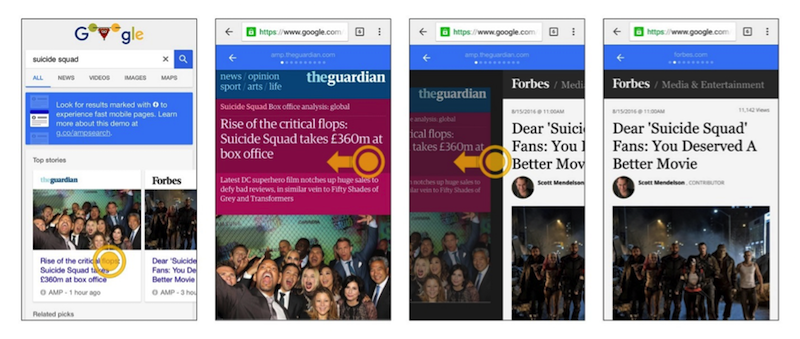
And now, imagine a world where web pages loaded instantly. Google and a bunch of other technology companies and publishers imagined it. They put their heads together and created the AMP (Accelerated Mobile Pages) project, which is an open-source HTML project dedicated to fast and furious page loads.

amp pages

What does this mean for you?

It means that you can put AMP code on your web page or post and deliver instant page results. So when your site visitor is at the grocery store and they’re trying to look at your blog about the clean 15, it won’t take five minutes for your site to load. That list of chemical-free fruits and vegetables will be at the user’s fingertips, instantly. You’ve just made a happy customer.

Facebook has its own version of fast content delivery, called Instant Articles. When content is uploaded to this Facebook publishing tool, the content is housed on Facebook and loaded instantly for viewers. Like Google’s AMP technology, Facebook Instant Articles are geared to mobile users.

To reach the goal of speedy page loads, AMP provides a plethora of web tools that create a common ground between websites that use it.

The AMP project leaders chose to make the software open-source so all platforms, developers, and publishers could collaborate to make the mobile web a faster and more pleasant experience.

AMP code works with photos, videos, and GIFs, in addition to written content. And AMP-optimized web articles will soon begin to appear throughout the organic mobile SERPs.

AMP technology also offers the option of caching. Third party platforms can access AMP content and cache it for their users. Google even provides its own Google AMP Cache, a free collection of AMP content that’s been published to the web.

WordPress developers already produced a WordPress AMP plugin. And many of the most prominent publishers and platforms, such as The New York Times, Pinterest, LinkedIn, and Mashable, are participating.

Of course, all of these features translate to faster page loads and longer engagement

Mobile web technology is the technology of the future. It’s imperative that website owners implement tools that are capable of delivering the kind of service that mobile users are looking for—fast, secure, and easy to navigate.

As Richard Gingras of Google states about the AMP project, “We wanna make the web great again.”

Tuesday, August 30, 2016

Five very quick tips to building a loyal ecommerce customer base

A few weeks ago, we discussed how ecommerce and retail companies can best acquire new customers via Facebook Lookalike targeting. So now that you’re building your customer base, let’s study how best to keep that very valuable base engaged.

Remember, your existing customers are a constant stream of revenue. We know they already like your products; now we want to make sure we continue to showcase new products and sales and in general stay top of mind with them.

This creates loyal customers and tons of repeat revenue – without that first layer of acquisition costs.

The balance can be tricky, though; how do you re-engage your customers without bombarding them with the same ads and messaging? How do you give them space but also encourage them to return to your site?

There are a few main things to keep in mind when setting up your re-engagement efforts:

Choose your platforms

Given we know who our customers are, I recommend using Facebook custom audiences (on both Facebook and Instagram) and Google’s customer match targeting options (Gmail Sponsored Promotions and RLSA are those I would most highly recommend).

lookalike audiences on facebook

Use data to determine your re-engagement intervals

To calculate how often you should show your ads to customers, determine when they tend to come back to your site after purchasing. Do you typically see purchases made 15 days after the first purchase? 30 days later? Longer? This is when you should begin re-engaging with your customers.

Focus on creative

We want to make sure we are providing the user with a good reason to come back to our site. You’ll want to showcase your products and ensure you are not showing the same ad over and over again. Refresh creative consistently to show new product as well as top sellers.

Use sales and promotions

Always hit your customers when you have a sale going on. This is typically the most successful of re-engagement efforts. Loyalty rewards programs are great for this, too; since you’re not spending to acquire these customers, you should have a bit of margin to play with for loyalty-based discounts and incentives.

Get smart with your first-party data

This part is important: we don’t want to just hit our entire customer base and treat them as equal. We need to segment our customer list by identifiable characteristics.

For example – AOVs (do they purchase more expensive products or cheaper products?), Gender, Product categories or type, etc. By segmenting out our audience type, we can better tailor our creative and the product we show to our customers to better suit their needs/interest.

Smart segmentation allows us to truly speak to our customers with relevant and tailored messaging, products, and overall user experience, which helps with both CTRs and CVRs.

For example, let’s say you are an ecommerce shop with a variety of different products – from expensive handbags to shoes to clothing. By segmenting out users who purchase expensive handbags, you can then re-engage them with creative around ‘the newest/trendiest’ handbag – or your annual handbag sale.

There are other benefits associated with your customer base, of course – notably mining characteristics of that base to create lookalike targeting in the pursuit of new customers. But I’ve seen all too many brands pay too little attention to the five steps outlined above.

Don’t leave all that juicy revenue out there; get smart about re-engaging and watch your numbers climb.

Why understanding frequency is key to success with Facebook advertising

How do you ensure that your Facebook ad campaign is working as hard as it possibly can? 

For Facebook advertisers, it can be easy to get stuck into the multitude of statistics and metrics that your campaigns generate.

For those that are analytically minded, Facebook marketing can feel like being a kid in a candy shop, but can be equally daunting to the uninitiated.

Reach, the number of unique individuals have seen your post, gives you an indication of just how far your ad has been seen, but it doesn’t really give you much of an indication of how effective it is.

It’s a similar story for impressions, which tells you how many times your ad has been served. The key metric is the latter divided by the former – frequency.

Frequency is a measure of how many times a user has been exposed to your post, and acts as an indication of how effective your targeting is. If your frequency is low, you are arguably targeting too wide an audience, investing too little to reach your target audience, or a combination of the two.

There are different ways of viewing frequency, and Facebook divides your campaigns into three levels; you can view the frequency for each ad, each group of ads (an ad-set) or each campaign (a collection of ad-sets).

Ad level frequency

Ad level frequency is the simplest level of frequency analysis. In the example below, each dot refers to a unique user, with the encompassing circle representing one ad.

As users who have already seen the ad are served it again, the impressions increase. However, because the number of users hasn’t increased, so does the frequency (because a greater number of impressions are served to a static number of users).

facebook frequency

In this example, we have 19 unique users (represented as individual dots), with an ad that has been served a total of 27 times (once to 13 people, twice to four people and three times to two users). This generates a frequency of 1.42.

Ad-set level frequency

Ad-sets are designed to group ads together, making it easier for advertisers to organise and manage multiple campaigns, and manage their collective spend and targeting. This allows the targeting for many ads to be changed quickly and efficiently.

That might be great for campaign management, but it’s not so brilliant for frequency management. Ad-sets track all of the users who have visited all ads and if an individual is served several ads from an ad-set, that will still only count as one unique user.

One user that sees five ads would be considered as “one unit” of reach, five units of impressions and so that individual’s frequency would be classed as ‘five’.

facebook ad set frequency

In this instance everything within the larger oval is the ad-set.

  • The green Ad still retains its 19 unique visitors, 27 impressions, and Frequency of 42
  • The red Ad has 20 unique visitors, 22 impressions (as 2 individuals see the ad twice), giving a Frequency of 1
  • 12 of the users however, have seen both Ads, with 1 user seeing both Ads twice
    • The total unique users is 27 (not 39, which would be a combination of both ads)
    • The total ad-set impressions is 49 (which is the combination of both ads)
    • This pushes the frequency of the ad set up to 81, despite the green ad having a frequency of 1.42, and the red ad having a frequency of 1.1.

Confused yet?

As both ads in this ad-set are served with the same targeting, they’re just as likely to be served either ad. Adding new ads within ad-sets would only compound the problem, so you should look at limiting ad volume within ad sets wherever feasible.

Campaign level frequency

A cursory look at the next level of frequency reporting potentially complicates matters further. In campaign level frequency analysis, we have a situation where a campaign may include several ad-sets, each with their own targeting.

That’s not really an issue when each ad-set includes mutually exclusive targeting, typically when negation is applied, but as we can see from the example below, many targeting approaches will overlap. After all, your audiences may have many interests.

A user may be a fan of a specific confectionary brand page already, or they may not – they can’t be both. However, complications arise when the targeting may seem mutually exclusive at first glance, but in actuality it isn’t. A fan of chocolate may also be a fan of candy, which means that they are likely to see ads from both ad sets.

campaign level frequency

In the above example, ad-set one (to the left) has two ads, as does ad-set two (to the right). Ads one and two, in ad-set one, have 31 unique users between them. As some individuals have seen each ad several times, their impressions is at 71, giving that ad-set a frequency of 2.09.

Ad-set two (to the right) has 35 unique users, and 82 total impressions, giving that ad-set a frequency of 2.34.

However, some of those users will feature in both ad sets, so the campaign as a whole has 54 unique users, and 153 impressions. That’s a frequency of 2.8, which is a step up from both ad-sets.

So how does this work in practice?

Let’s take an example of the sweet company wanting to promote their latest line of confectionary products.

Of the two products that they want to promote, one includes gelatine based products, and the other contains chocolate products, the brand therefore creates a campaign with two distinct ad-sets: one aimed at gelatine lovers, and one at chocolate lovers.

One of our target audiences, Tom loves gelatine, whilst another member of audience, Dick, loves chocolate. However, poor Harry loves Turkish Delight. Unlike Tom and Dick, he gets targeted by both the gelatine product ads and the chocolate product ads. While Harry is technically well served by the targeting, he gets an ad about milk chocolate, then an ad about jelly beans, rather than just one type of confection.

That may not sound like a huge problem, but it doesn’t give you a true indication of your Facebook ad strategy.

So what level should you listen to?

Campaign level frequency will provide you with the truest picture, but that alone won’t tell you the full story behind your campaigns.

campaign frequency on facebook

Check your campaign. If it’s got a low frequency, then no problem. If it’s starting to creep up, then look at the ad-set level. If the ad-set levels are fine, then the first thing to look at would be to see if and where your targeting is duplicated.

If one or more of your ad-sets are high in frequency, then look at your ads. See if you have too many, turn them off, review how broad or narrow your targeting is, and look to either expand, or turn the ad-set off completely.

Why is high frequency an issue?

With the average internet user exposed to 1,707 banners each month (Comscore), campaigns can be serving your ads to people who just aren’t paying attention to them. They come up in their feeds, but they don’t get seen or actioned upon, leading to what is sometimes known as “banner blindness”.

Banner blindness (individuals learning to sub-consciously recognise, and then ignore your Ads), and campaign fatigue (signs of the campaign being less effective as time goes on) can be disastrous for your ads campaigns. It leads to soaring costs and diminished returns, but this isn’t the worst case scenario for a campaign.

If users receive several iterations of an ad over and over again it can start to feel like spam, and breeds negative sentiment towards the brand. Even worse, given that the ads are being displayed on a social platform, it’s easier for users to vent their frustrations as comments that remain visible to all future audiences.

So just what should your frequency be?

There’s a fine line, and much debate, on whether or not individuals will get annoyed, or whether they’ll see an ad enough times to be finally convinced to click.

The size and type of targeting that you’re doing will ultimately determine what the optimum frequency should be.

Smaller campaigns, focusing on a smaller number of individuals, will naturally reach a higher frequency, but if the ads are more accurately targeted, a higher frequency might be less of an issue.

If you focus on an audience that loves bear shaped gelatine products in London only, but the ads are tailored to the London Gelatine Bear Emporium just around the corner from where the audience lived, they may take more kindly to seeing the ads more often.

While it’s less likely to reach a higher frequency as quickly, broader targeting may start to annoy users who see the ads multiple times.

Users may become much more sensitive to how often they’re seeing the ads, given the drop in relevance with the targeting. Non-specific ad copy is for anyone, and being told about sweets 11 or 12 times when you’ve seen the message, taken it on board, and decided to do something about it (even if that decision is to ignore it) the message serves only to frustrate an audience.

As a rule of thumb, a frequency between five and ten for an entire campaign is still acceptable, but you have to review this at a campaign level to ensure it encompasses every individual that sees every ad, and not just focussing on either ad set one, or ad set two.

Splitting the report up will count a unique user every time they’re served an ad, giving false duplicates. Only viewing at campaign level with no other splits (demographic/day by day/device etc.) will show the true story.

So how do you avoid ad frequency mayhem?

Having established that there is no defined “right or wrong” answer to the frequency conundrum, how do we go about ensuring that we can at least control our ad campaigns? There are some key stages to go through:

Do your targeting homework

Understand your audience and use some of the extensive tools that are available to you in order to find them. The more you know about your audience, the better your targeting can be.

Plan your targeting coexistence

Could there be any cross-over between your ad-sets? If so, try to separate one group from the other to minimise the risk of duplication.

Choose your budget wisely

If an audience is particularly niche, track the reach, and campaign duration. If you plan to reach 100 people a day, are expecting £1 cost-per-click and the campaign lasts seven days, then £700 for the campaign will need every single user to click on the ad (or for some users to double click). Calculate your possible CTR and if it’s unrealistic, plan ahead by reducing spend or widening your targeting pool.

Manage campaigns, ad sets, and ads properly

Don’t setup several campaigns to target specific groups of people that will likely contain similar users. For example a group that likes chocolate, and a group that likes Mars Bars – one of these groups will largely encompass the other. Frequency won’t show up at an ad-set level report as Facebook will tally each individually, and your folly will only appear under the campaign level reporting.

Know how to report on frequency

Look at the big picture. Don’t review frequency on a day by day basis, ad by ad, or even ad-set by ad-set (each splits up your unique users). Look at the whole campaign.

Limit ad volume

A large volume of ads pushes Facebook to serve as many of them as possible to the same audience, increasing the likelihood of frequency jumping high.

While you may be tempted to include many ads to A/B test your creatives, don’t do this to an excessive level. A couple of ads per ad-set should be your limit. Trust your creative!

Review your ad relevance score

If some of your ads have a low score, it’s likely not resonating with the audience, so remove it. This removes the ad from collecting additional reach.

Will Conboy is head of marketing communications at Stickyeyes and a contributor to SEW. This article was co-written with Jonathan Hemingway.

Google AdWords: the dos and don’ts of callout extensions

Callout extensions are a really important component of Google AdWords, and they can be incredibly useful in describing what your business has to offer that may not be clear by your links and description alone.

Take the example below from Google:

acme example

“Acme Electronics” uses AdWords and is able to list their website in the first line, general business description in the second line, and then the third line offers three “call-out” phrases where they can let users know about special services they offer which set them apart from the competition.

It is a non-clickable addition to your listing, similar to rich snippets. In this case they have chosen three callout extensions:

  • Free Shipping
  • 24-7 Customer Service
  • Price Matching

It is clear that in order for callout extensions to be useful, you want to pick things that are not only relevant to what your company offers, but also things that are going to stand out and set your company apart from the rest.

So what are the best practices? How can you take this opportunity and make it work for your business? Read below to get a feel for how to be most successful:

Getting started with callout extensions

Not only are callout extensions included in your AdWords advertisement options, but if you aren’t using them, you are still paying for this space that just simply isn’t being used.

To get started you will want to sign in and open your AdWords account. Look at your campaigns tab and then click on “Ad Extensions” to the campaign where you want to make this addition.

Then you will want to view your “callout extensions” from the dropdown menu. Callout Extensions can be implemented at account, campaign, or ad group level. See the screenshot below as an example:

callout extensions

Once you have filled out 2+ callout extensions (although 3-4 is recommended), the page will look something like this:

number of callout extensions

As you can see in this example above, four different callouts are being used by the AdWords account above:

  • Customized quotes
  • Nationally recognized
  • Unsurpassed quality
  • Creative edge

Anywhere from two to four of these four callout extensions will appear at the bottom of the ad, just like the Acme example above.

Remember that callout extensions may not always show on your ads either – AdWords use several factors to determine how many callouts will actually show at any given time (if any at all).

Unfortunately these factors are unknown, but that being said, the basics are easy with callout extensions and it takes practically no time to get them set up.

The hard part is getting creative and figuring out exactly what it is that you need to do to develop the correct callout extensions for your business specifically. Keep in mind that callout extensions are nothing new, but some of the dos and don’ts have changed, so learn the latest best practices below.

Do: highlight services you offer

Do you offer free shipping? 24/7 customer service? Price matching? These kinds of services that are exactly what you want to highlight in callout extensions.

People love to know that when they choose a business, they are going to be getting some benefit with you that they won’t get from someone else. When it is right in the ad itself, people are more likely to click and move forward with your company.

Do: create multiple callout extensions

One thing that really helps for optimizing callout extensions is to create four or more extensions for each campaign. The more that AdWords has to work with, the more optimized your ads are going to be. You shouldn’t have less than 4 callout extensions on any campaign, and the more the better!

Do: be unique and creative

Originality and uniqueness are the basics for developing callout extensions because they are going to draw attention that other companies in your industry do not have on their campaigns.

One of the most challenging parts is actually thinking of two-word phrases that will capture attention. There are a ton of callout extension “lists” online that can help to get you started, but you really want to choose something that is original and eye-grabbing.

In the AdWords account above for an advertisement photographer, the phrase “nationally recognized” is effective because it sets their studio apart from other photographers with credibility. Try to think of things that other businesses may not necessarily have when stacked up against you.

You can also implement custom callout extension scheduling so you can have certain extensions only run in the morning, during holidays, or whatever is going to optimize your specific campaigns.

Don’t: go overboard on characters

The limit for characters on callout extensions is 25, but I would recommend only using 12-15 characters for each callout extension that you add. You want them to be readable and really eye-catching. When you go overboard on this you limit the chances that 3 extensions are actually going to fit nicely side by side.

Don’t: use title casing

Title casing means that you capitalize: All of The Letters in the Sentence or Phrase. While this might be tempting to do, studies have shown that it is actually more effective to only capitalize the first word of the phrase in Google AdWords callout extensions.

This is because it is easier for people to read three side-by-side, and it puts more emphasis on each individual phrase. Although this might feel a little awkward, it is definitely best practice in this case.

Some examples!

Below are a list of callout extensions that could be useful. Keep in mind that you must offer these services and have them be relevant to your industry in order to actually use them as callout extensions:

  • History of results
  • 40yrs combined experience
  • No service fees
  • Money back guarantee
  • Free Cancellation
  • 24/7 customer service
  • Best price guarantee
  • Peace of mind guarantee
  • Best rate guarantee
  • Top customer service reps
  • Expert friendly service
  • Guaranteed satisfaction
  • 10% Off clearance items
  • Customization leader
  • Free shipping
  • Satisfaction guaranteed
  • Shop best sellers
  • Top designer collections
  • Price matching
  • Upfront pricing
  • Trusted for 50 years
  • Fast response
  • Affordable pricing

The takeaway

Callout extensions are a great opportunity to add more to your existing ad. In fact, you can even hack the system and use them as an additional line on your ad if you want to.

The important thing is to make sure that you are using callouts to the fullest and taking every opportunity you can to make them unique, useful, and stand-out compared to other competitors in your industry.

Make sure that you highlight the services you offer that make choosing your company the best deal. Most importantly, make sure that you implement multiple callout extensions (more than 4), so that AdWords can optimize your ads in the most useful ways.

And lastly, keep the character limit low and don’t use title case. Hopefully these dos and don’ts will get you on track and help your callout extensions to be more optimized than they are currently!

Do you have any other thoughts on callout extension advice? Let us know in the comments section below! We would love to hear from you.

Amanda DiSilvestro is a writer for HigherVisibility, a full service SEO agency, and a contributor to SEW. You can connect with Amanda on Twitter and LinkedIn

Monday, August 29, 2016

Why do big US companies take mobile less seriously than Chinese companies?

If you want to know how seriously any public company takes mobile, then take a look at the annual/quarterly reports.

While top Chinese retailers, banks and internet companies are keen to share their mobile success with their investors, their US equivalents are often shy to reveal their numbers… especially the biggest US retailers.

While researching a series of in-depth m-commerce reports for ClickZ Intelligence, I needed to establish which of the world’s biggest countries are really making headway with mobile. The results are worth sharing.

The methodology was simple

1) Use Forbes’ Global 2000 as a guide.

2) Stick to US and Chinese companies (as they dominate the Forbes list).

3) Concentrate on consumer facing businesses where mobile isn’t the core business, but should be a very significant sales channel, so retailers, restaurant chains, banks and internet companies are in; but mobile companies and oil companies and manufacturers are out.

4) Then check the latest annual (2015) and quarterly statements (Q1 and Q2 2016) to see which detailed mobile performance – only hard numbers; PR fluff was ignored.

The results were striking:

  • The top Chinese banks, retailers and internet companies all (of those considered) detail mobile performance, often in considerable depth.
  • Three out of four top US banks declare mobile numbers. But not in as much detail as the top four Chinese banks.
  • Of the two US internet giants, only one details mobile performance: Facebook. Alphabet (Google), surprisingly, doesn’t.
  • Not one of the Top 10 US retailers from Wal-Mart to Amazon.com, shared mobile stats in their recent annual or quarterly report.

The US retailers were a big shock – especially Amazon. In 2016, you have to ask: why we couldn’t find any indication of mobile performance in financial reports of the US top retailers?

And, more importantly, you have to ask: why aren’t investors and analysts asking the same thing?

The more financial reports you look at the more you come to the conclusion: Chinese companies – and their investors – take mobile more seriously.

They saw the mobile opportunity earlier; they made it a priority to re-engineer their companies to take full advantage; and now they want investors to benchmark them on their impressive mobile performance.

Alibaba: the benchmark in mobile performance and reporting

This month the Chinese ecommerce retail market place Alibaba redefined what it means to be “mobile first” announcing that it has 427 million mobile monthly active users (MAU) – out of a total of Alibaba’s 434 million total users.

In the latest quarter (Q2, 2016), mobile accounted for a stunning 75% of value of all goods bought and sold on the platform and 75% of its revenues.

Just to put Alibaba’s 427 million mobile users into perspective:

  • The entire population of the US is 324 million.
  • Walmart’s global customer base 260 million (Note: Walmart measures weekly shoppers; Alibaba’s are monthly).

ali baba quarterly figures

The wake-up call for all companies is twofold

  1. A mobile-first strategy delivers tangible rewards.
  2. How well the markets received the news…

Financial investors and analysts loved Alibaba’s results. On announcement of the Q2 results, the stock leaped to its highest level for 18 months.

This is the carrot: impressive mobile performance is increasingly a factor (one of several) that encourages investors to purchase stock.

The question is: when will US investors / analyst start to use the stick to punish (US) companies that keep their mobile numbers a secret?

US investors are becoming well acquainted with, and increasingly attracted to the Chinese retail and internet companies such as Alibaba, JD.com, Baidu and Tencent (all of which detail impressive mobile performance in their financial reports; all of which saw their share price improve on the latest results.

Three out of four are quoted on US markets: Alibaba is listed on the NYSE; JD.com and Baidu on Nasdaq (Tencent is listed on HKSE), which means they’ll remain front of mind.

For share price performance, see: BABAJDBIDU; and 0700.HK (Tencent).

Stick and carrot – Facebook’s mobile story

Any US company that doesn’t believe how seriously US investors take mobile needs to look at Facebook’s recent financial history.

One of the main reasons Facebook’s share price went into freefall post its 2012 IPO was that investors were very unimpressed with its mobile story. One of the main reasons they love it now is because they are impressed with its mobile numbers.

As recounted by Fortune in 2015:

Facebook used its weakness on mobile as a motivator. When the company went public it had no meaningful revenue from mobile. Within 18 months, Facebook delivered a magnificent about-face on mobile, quieting the haters in the process. By the end of 2013, more than half of Facebook’s revenue came from mobile ads. “You want mobile revenue? We’ll show you mobile revenue!” the company seemed to say. Wall Street rewarded the company by trading up its stock.

Today Facebook wants to be measured on its mobile record. In its Q2 2016 results statement it couldn’t shout louder about its mobile success:

Second Quarter 2016 Operational Highlights

  • Daily active users (DAUs) – DAUs were 1.13 billion on average for June 2016, an increase of 17% year-over-year.
  • Mobile DAUs – Mobile DAUs were 1.03 billion on average for June 2016, an increase of 22% year-over-year.

Second Quarter 2016 Other Financial Highlights

  • Mobile advertising revenue – Mobile advertising revenue represented approximately 84% of advertising revenue for the second quarter of 2016, up from approximately 76% of advertising revenue in the second quarter of 2015.

The phenomenal rise of Facebook’s stock price, see FB, from mid-2013 tells you everything you need to know about investor attitude to mobile.

How the largest companies rack up on mobile transparency

By way of research we looked at the recent annual and/or quarterly reports and earning statements of relevant companies from the world’s biggest public companies according to Forbes, which is dominated by Chinese and US companies, to see to what extent (if at all) mobile performance is displayed.

The Forbes rankings are based on a mix of revenue, profits, assets and market value.

Chinese banks:

Three Chinese banks occupy the top three Forbes rankings, with a fourth in sixth ranking. All four appear to have made mobile banking a priority over recent years and the numbers are staggering. At the end of 2015, they have 590 million mobile banking customers between them. That’s 1.8 times larger than the population of the United States.

  • Industrial & Commercial Bank of China has 190 million mobile customers, with annual transaction volume of over RMB800 billion (US$121 billion), which is approximately 38% of its customer base. (Source 2015 Annual Report)
  • China Construction Bank has 182.84 million (up by 25% year on year) mobile banking users, with a transaction volume was RMB15.4 trillion (US$2.3 trillion), which is approximately 54% of its customer base. (Source 2015 Annual Report)
  • Agricultural Bank of China has 140 million mobile customers, with annual transaction volume of over RMB9.6 trillion (US$1.5 trillion), this is approximately 29.5% of customer base. (Source 2015 Annual Report)
  • Bank of China has 79 million mobile customers, with annual transaction volume of over RMB5.2 billion (US$0.7 billion), the proportion of the customer base that is mobile is unclear. (Source 2015 Annual Report)

US banks:

Three of the top four US banks share mobile banking numbers. Although mobile customers are dwarfed by the vast numbers of their Chinese counterparts are a significant proportion of their total user base.

  • JP Morgan Chase (Global Rank 5) has 24.8 million active mobile customers. As JPMC only counts its customer base by households (59.2 million), rather than individuals, it is unclear what proportion of customer are mobile. Mobile transaction value is unavailable. (Source Q2 2016 results).
  • Wells Fargo (Global Rank 7) has 18 million mobile active users. This is approximately 25.7% of customer base. Mobile transaction value is unavailable. (Source Q2 2016 results)
  • Bank of America (Global Rank 11) has 20.2 million active mobile banking customers in Q2 2016. It is unclear what proportion this is of the total customer base. But it does reveal in its investor presentation that mobile equates to 17% of total deposit, and on a weekly basis it is the most active channel. See charts below. (Source Q2 2016 results)
  • Citigroup (Global Rank 13). We were unable to find mobile numbers for Citigroup, but the company did state in its 2015 Annual Report that it is implementing a “mobile first” approach via a newly established Citi FinTech unit.

Brian Moynihan Chairman and CEO, Bank of America explains to shareholders why mobile banking is so important:

Why are we tripling our investment in 2016? It is simply because this is how customers want to do business with us. Our customers deposit 250,000 checks a day through their mobile devices, reflecting 15 percent of consumer deposit transactions. We would need an additional 650 financial centers to handle the deposit activity that is currently being done on those mobile devices.

bank of america figures

Chinese retailers:

China’s highest ranking retailers on Forbes list are Alibaba (rank 174) and JD.com (rank 800). Despite their lowly ranks, compare to US companies such as Walmart (rank 15), these are no small fry.

  • Alibaba is an internet marketplace where third-party retailers sold RMB 837 billion (US$ 126 billion) of goods in Q2, 2016. (That’s six times the value of goods sold on eBay in the same quarter). As noted above, 75% of this GMV and 75% of the revenue it makes from these sales. Total revenue is RMB 32.2 billion (US$ 4.8 billion), which means Alibaba’s revenue from mobile is

Most interesting is the news that Alibaba now makes more money from each of its 427 million mobile user than from non-mobile customers. (Source Q2, 2016 results)

  • JD.com is a direct ecommerce retailer and internet marketplace, it makes more in revenue than Alibaba, at RMB 65.2 billion (US$9.8 billion), in Q2, 2016, hence its claim to be “China’s largest ecommerce site by revenue”. But GMV (value of total goods sold) is lower than Alibaba at RMB160.4 billion (US$ 24.1 billion), though still slightly above eBay.

Unlike its rival, JD does not reveal what proportion of revenue or GMV is mobile or the number of mobile users. But it does declare that an impressive 79% of its orders placed on mobile. (Source: Q2, 2016 results)

Like its rival Alibaba, JD’s earnings were well received by investors.

dna28_jd.com_mobile_share

US retailers:

Compared with the mobile details (and outstanding mobile performance) shared by the Chinese retailers, the details shared by US retailers is disappointing.

Searching through the 2015 annual report and quarterly earnings statements (up to August 18 2016), we were unable to find mobile performance numbers of any descriptions for the following US retailers and restaurants.

  • Wal-Mart Stores (Forbes rank 15)
  • CVS Health (rank 62) – no mobile numbers apparent in 2015 annual report, Q1 or Q2 2016 reports.
  • Walgreens Boots Alliance (rank 107)
  • Home Depot (rank 112)
  • Target (rank 164)
  • McDonald’s (rank 189)
  • Costco Wholesale (rank 192)
  • Lowe’s (rank 205)
  • Kroger (rank 223)
  • com (rank 237)
  • The Priceline Group (rank 445)
  • Macy’s (rank 515)

There were two US retailers/restaurants sitting outside the top 10 that revealed some details of mobile performance:

  • Starbucks (Forbes rank 389) reveals the adoption of mobile ordering and payment by customers. In Q3 2016 Mobile Order and Pay usage reached 5% of the coffee chain’s U.S. transactions, up from 4% in Q2 FY16. (Source Q3, 2016 results)
  • eBay (rank 466) does not include details of mobile performance in its actual earnings releases, but in an accompanying “Fast facts” document it declares that $9.5 billion of sales on the auction site were completed on mobile devices in Q2 2016. This means mobile sales volume is now 45.5% of the GMV for the quarter ($20.9 billion). eBay also states that 57% of sales are touched by mobile at some point. (Source eBay Fast Facts – PDF).

Chinese internet companies

There are two prominent internet companies in China, Tencent Holdings (Forbes rank 201) and the Baidu (rank 349):

  • Tencent businesses include the QQ web/mobile portal, instant messaging and gaming platform, the Qzone social media site and the Weixin/WeChat social/chat smartphone application. As of June 2016, Mobile QQ has 667 million monthly active users (MAU) users, Qzone has 596 million MAU and Weixin/WeChat has 806 million MAU. Mobile’s contribution to revenue is not available, except reporting that smartphone games delivered RMB 9.6 billion (US$ 1.4 billion) in revenue (Source Q2, 2016 results)
  • Baidu is a mobile/web search engine, with portfolio of associated products. In its Q2 2016 results it reported it had 667 million mobile search MAU and 343 million mobile maps MAU. Total or online MAUs were not reported. Mobile revenue represented 62% of total revenues for the second quarter of 2016, compared to 50% for the corresponding period in 2015. This works out at RMB 11.3 billion (US$ 1.7 billion). (Source Q2, 2016 results)

US internet companies

The two prominent Internet companies in USA are Alphabet, the company formally known as Google, (rank 27) and Facebook (rank 188). The contrast is remarkable.

  • Facebook now has over 1 billion (1.03 billion) mobile daily users (DAU), which is 91% of total DAU. Mobile advertising revenue accounts for 84% of total ad revenue (US$ 24 billion) which means Facebook earns US$ 5.24 billion in mobile ad revenues.
  • Alphabet does not report mobile numbers in its 2015 annual report or 1Q or 2Q 2016 reports. It appears from the investor earnings calls that mobile is very important to Google, which makes it inexplicable that the company does keep investors informed of mobile performance. (Source Q2, 2016 results and earnings call)

Sundar Pichai, CEO Google, investor briefing Q2 2016:

“Q2 2016 earnings call: Our investment in mobile now underlines everything that we do today from search and YouTube to Android and advertising. Mobile is the engine that drives our present.”

Room for improvement

We look forward to the time when US companies feel confident enough about their mobile numbers to share them in their financial reports; or the time when investors start to insist on it.

N.B. This study was not an in-depth research project, it was based on observations from the companies’ financial reports. If any of these retailers share numbers elsewhere / or would like to share their mobile numbers, please contact the author Andy Favell who will be very happy to update the ClickZ readers.

Read the reports:

This is Part 28 of the ClickZ ‘DNA of mobile-friendly web’ series. Here are the most recent chapters:

Andy Favell is ClickZ columnist on mobile. He is a London-based freelance mobile/digital consultant, journalist and web editor. Contact him via LinkedIn or Twitter at Andy_Favell.

40 free digital marketing tools to help grow your business

If you’re just starting out with a business, or looking for tools to help you grow, there is a huge array of digital marketing tools, platforms and services available online.

But if you have a small budget to work with or you aren’t sure which are the right tools for you to be investing your money into – or maybe you just want to bolster your digital marketing without spending too much – then how can you narrow your options down?

To help out, we’ve put together a hefty list of 40 free digital marketing tools that can help you grow your business, in every area of marketing: from email to events, content to social media.

This is partly a refreshed and updated version of the excellent list of 50 digital marketing tools to grow your start-up put together by Bryan Eisenberg last year, and incorporates many of his picks as well as suggestions from the comments section. If you know any great free tools that have been helpful in your own digital marketing efforts, please suggest them in the comments!

General sales & marketing

Hubspot

Hubspot is an inbound marketing software platform, much of which is free to use. Its free sales software allows you to build email templates, a shared library of sales content and documents, integrate with Gmail and Outlook, schedule emails and more.

Hubspot also offers a free Customer Relationship Management (CRM) software which integrates with it. If you’re minded to upgrade, the Pro version starts at $50 per person per month. (Suggested by Luke Hamon)

Sniply

Sniply is a very interesting tool which lets you build custom calls to action (CTAs) and add them to content that you share. As long as the page you’re sharing supports iframes, you can create your custom CTA button and message and add it in over the page, which only the people who access your link will be able to see.

SumoMe

SumoMe boasts a powerful suite of marketing tools, including content analytics, an email scroll box, contact form, image sharer and more. The free version gives access to all of SumoMe’s apps, plus more features like A/B testing are available to Pro subscribers, starting at $20 a month.

Ampervize

If you aren’t sure where to start with digital marketing tools, a free report from Ampervize could give you a springboard. Based on your responses to a couple of simple questions about your business, it will produce a tailored report recommending marketing providers and the areas of marketing which are most likely to deliver results.

Ampervize recommended providers

Cyfe

Cyfe is an all-in-one dashboard for managing your business tools online. Add widgets for everything from advertising tools to blog platforms, email tools, SEO and social media to manage them all in one place. The free version supports up to 5 widgets, or you can upgrade to premium for $19/month.

Email marketing

Boomerang

Boomerang is a free app for Gmail, Outlook and Android with a range of email management tools. It integrates easily with your inbox interface to add features like email scheduling, snoozing, read receipts and follow-up reminders.

I use this all the time simply for email scheduling and read receipts, and Boomerang has developed some more advanced features aimed at businesses, including – most recently – an AI assistant which helps you to craft the perfect email, launched just this week.

Boomerang respondable

MailChimp

You’ve probably come across MailChimp in your travels (especially if you’ve ever listened to the podcast Serial), and there’s a good reason why it’s so popular.

Completely free for up to 2,000 subscribers and 12,000 emails per month, it’s an easy option for small businesses and groups to get to grips with newsletters, with built-in signup forms, templates and free data insights to track how your email marketing stacks up against your industry.

Klaviyo

Klaviyo is an email marketing software which helps you send out personalised and targeted emails, and is free to use for up to 250 contacts and 500 email sends. The free accounts also include A/B testing tools, integrations, segmentation and a drag-and-drop responsive email creator.

Structured Data Markup Helper

Schema.org is a type of structured data markup that you can add to emails in Gmail to enable some great interactive marketing features, like auto-adding to Google Calendar, one-click reviews and RSVPs and integration with search.

Google’s Structured Data Markup Helper does all the hard work of coding for you, and all you have to do is highlight the relevant part of an email and select from the drop-down menu to mark it up. For more information on Schema.org for emails and getting started, check out how to add Schema.org markup to your email marketing.

A screenshot showing the Google Structured Data Markup Helper for emails.

Hiver

Hiver is an email collaboration tool designed to help you work more efficiently using shared accounts. Track tasks, access shared mailboxes, write notes, assign emails to team members and mark them completed when done. The free version supports up to 3 users, or you can upgrade from $6/month to work with larger teams.

Content creation & curation

Apester

Apester is a handy free tool for creating interactive content like quizzes, which can liven up your content marketing with some fun and engaging pieces. We’ve been using it here at ClickZ and Search Engine Watch to power challenges such as ‘How well do you know these 25 SEO abbreviations?‘ and ‘Can you decipher these marketing and business buzzwords?

Piktochart

Piktochart is a popular and easy-to-use tool for creating infographics, along with other types of visual content like presentations and posters. Its drag-and-drop interface is really simple and the results look slick and professional.

Canva

Canva is another versatile, free visual content creation tool – and in the age of the visual web, you might as well have all the tools you can at your disposal! Canva helps you create attractive visuals for everything from social media graphics to presentations, banners, blog graphics and business cards.

canva

Listly

Listly is a fun and free platform for curating and sharing all sorts of lists, on any topic from film to technology, education to marketing. Other users can follow your lists and upvote their favourite items to make them rank higher. I’ve curated the tools in this article into their own Listly, so feel free to comment and upvote your favourites!

Triberr

Triberr is one part content sharing platform, one part influencer marketing platform. If you’re a blogger or content creator, you can use it as a platform to share content with a network of fellow content creators, and join groups for specific interests and topic areas – think of it like LinkedIn groups.

If you’re an agency, however, you can also use Triberr to conduct influencer marketing campaigns. You can prepare a campaign for influencers to apply to, set a budget, digital assets, goals and more. While you do have to pay the influencer(s), everything else is free to use with no other fees.

Social media

Socioboard

Socioboard is a social media management platform for businesses and brands, aimed at helping them with lead generation, customer support, marketing and engagement. You can connect up a range of accounts including Instagram, Facebook, Twitter, YouTube and LinkedIn to manage them from a central dashboard. The free version offers scheduling features, CRM and reporting tools for up to 5 profiles. (Suggested by Rupak Som)

Socioboard

Hootsuite

Hootsuite is a widely-used social media management tool which allows you to manage and co-ordinate multiple social networks, schedule posts, track analytics and keep tabs on certain keywords and hashtags via its ‘streams’ feature.

The free version allows you to connect up to three accounts, or you can upgrade to one of its paid accounts for more features.

TweetReach

TweetReach is a great tool for analysing the reach of any username, hashtag or keyword, estimating how many impressions it has made and how many individual accounts have been reached.

The free version only gives a snapshot of the past 100 tweets, so to get a more detailed analysis, you would need to upgrade to one of the paid options – or you can take multiple snapshots to build up a picture over time.

socialmention

socialmention allows you to search for any word, phrase or hashtag to see where people are using it across the internet. It’s useful for keeping tabs on a hashtag campaign or brand name beyond social media, as it also covers blogs, bookmarks, images and videos. You can also see whether people are using your term in a positive or negative context, its level of reach, and whether users are mentioning it repeatedly.

socialmention

Simply Measured

Simply Measured provides a selection of free reports you can use to analyse various social media accounts, including Instagram, Twitter, Facebook and Google+. Even more in-depth is its Social Traffic Analysis, which works in conjunction with Google Analytics to give an overview of your site’s social traffic, presenting it in a visual and easy-to-read format.

If you want to go further with social media tracking and analytics, don’t miss our list of nine free tools for measuring social ROI!

Video

Instagram Video

Facebook, Snapchat and Twitter all have their video offerings, but Instagram is still, as Christopher Ratcliff wrote in his piece on the best branded Instagram videos of 2016, “one of the best places for brands to experiment with short form video”.

Instagram video has all the filters you’ll be familiar with from uploading photographs, plus a choice of ratio and now a full 60 seconds to play with. You can shoot directly within the app or upload and trim an existing video.

Wistia

Wistia is a video hosting service for businesses, which came highly recommended by local SEO expert Greg Gifford in his Brighton SEO presentation on going beyond local SEO. It provides detailed analytics, engagement graphs and heat maps to show exactly how users have interacted with a video. The free option only supports three videos, but you can upgrade from $10/month to one of its paid options.

Powtoon

Powtoon is a free tool for creating animated marketing videos, explainers, animated infographics, or even videos and presentations that you can share internally within your business. The free account allows for videos of up to five minutes, with a watermark and outro. (Recommended by Deepak Gawas)

powtoon

WeVideo

WeVideo is an online video editing and collaboration tool, with cloud storage, a music library and editing on-the-go with a mobile app. The free version allows for five minutes of video publishing in 720p, with watermark.

Events

Eventbrite

Eventbrite is a widely-used and effective event hosting platform which allows you to create an event, invite attendees, manage tickets and registrations and promote your event to a wider audience. While it’s only free if your event is free to attend, there are fairly low fees for paid tickets, which you can often pass on to buyers as part of the event registration.

Lanyrd

An extensive social discovery platform for professional events, Lanyrd is great both for publicising your own event and finding other events at which to network, learn and make contacts. It allows attendees to share videos, slides and podcasts after the event, with remote tracking features so that anyone who couldn’t make it can follow along remotely.

lanyrd

Slideshare

Slideshare is an important complement to any event – the most convenient way to share and save presentation slides after an event has taken place, and a great platform for reaching a business audience.

AppsGeyser

AppsGeyser is a free tool designed to let you easily create an Android app. You can use it for any purpose, but it would be particularly useful for an event where you’d like to create a one-use app that will keep attendees connected and up to date, without a lot of expenditure.

HelloSign

HelloSign is a tool for helping you to get event contracts (and other types of contract) signed by requesting electronic signatures from up to 20 different people. It uses SSL encryption to keep documents safe, and will send out an email copy to everyone who signed a document, for their records. The free version is limited to 3 documents per month from a single sender; paid versions start from $13/month and have a 30-day free trial.

Analytics

Google Analytics

Google Analytics is a must-have for any suite of analytics tools, and the best part is that it’s completely free. Google’s all-in-one analytics dashboard gives insights into different traffic sources, pageviews, demographics, SEO, social media and a wealth of other information.

To find out how to set up Google Analytics for your website for the first time, check out YuYu Chen’s comprehensive beginner’s guide. Our guide to confusing terms is also on hand to help you decipher the lingo!

Buzzsumo

Buzzsumo is a content analysis tool which gives you a breakdown of the social shares for content published to any domain, allowing you to discover the most popular and shareable content for your own website – or a competitor’s – and find out which networks your content resonates with. Upgrading to a Pro account also gives you insight into backlinks and influencers, allowing you to see exactly who is sharing your content.

Bitly

Bitly is a free link shortening and tracking tool, which monitors traffic and referrals via custom links and displays detailed analytics about clicks, location, referring websites, activity over time and more. It’s widely used by publishers and businesses alike, and has a handy tagging system you can use to keep track of links from different marketing campaigns or portals.

bitly graphs

Quill Engage

Quill Engage provides reports which explain your Google Analytics data in plain English. So if you’re feeling baffled by all of the numbers and technical terms, give a free report a go – the free version offers reports for one Google Analytics account, which you can have delivered weekly and monthly.

SimilarWeb & GetHoneybadger

SimilarWeb is a useful tool for keeping tabs on your competitors. Using its free search tool, you can dig up stats on any website, including its rank globally, within its leading country, and within its respective category; traffic by country and sources; search and referral traffic; and more.

You can also audit yourself for some insightful stats, and put your performance side-by-side with competitors to see how you can compare.

For an even more seamless process, you can also use the Chrome extension Gethoneybadger to dig up stats about any website with one click. Gethoneybadger uses SimilarWeb to pull in analytics about that specific website, displaying them in a little window in the corner of your screen.

SEO

Google Search Console

Much like Google Analytics, Google Search Console is a must-have resource for webmasters, and is free to set up for your website. With it, you can monitor your site’s performance, identify any issues, submit content to be crawled, check on your mobile friendliness, view the searches that brought users to your site, and much more besides.

Christopher Ratcliff has written a complete overview of Google Search Console over at Search Engine Watch which breaks down each individual area and how to use it.

SEO SiteCheckup

SEO SiteCheckup will give you a quick and detailed health check of your website’s SEO for free, with an overall SEO score out of 100, along with a downloadable PDF report and information on keyword usage, images, backlink authority and other handy insights.

seo site checkup

Yoast SEO plugin for WordPress

Yoast is a free plugin for WordPress to help you easily manage SEO and optimise your webpages. You can use it to set templates for, and optimise, titles and meta descriptions, enter focus keywords, and fine-tune just about everything you could want about your Google listing.

Screaming Frog SEO Spider Tool

The Screaming Frog SEO Spider Tool is a desktop app that you can install on PC, Mac or Linux, which will crawl websites and analyse them for common SEO issues, such as broken links, duplicate content and response time. The free version works for up to 500 URLs, or you can buy an annual license for £99/year, which will also unlock a set of advanced configuration options.

Google’s Mobile Friendly and Speed Test Tool

For your business to be able to compete online, it’s become imperative to have a properly-optimised mobile site. Mobile traffic has surpassed desktop web traffic for the first time in 2016, and Google’s various ‘mobilegeddon‘ algorithm updates have increasingly penalised sites that aren’t optimised for mobile. So to give your site the best chance in search, it pays to track down and fix up those issues that keep it from working well on mobile.

Luckily, Google has made this free and quick to do with its Mobile Friendly and Speed Test Tool, which will analyse and test your site for mobile functionality and also speed issues, and advise you on how to fix them. Of course, you can always beat Google to the punch with our mobile-friendliness checklist.

mobile friendly

If you want to dive into free search optimisation tools in more depth, including site health checkers, sitemap generators, keyword research tools and more, don’t miss our roundup of 26 expert-recommended free SEO tools.

This article was previously published on our sister website ClickZ.

Friday, August 26, 2016

Five most interesting search marketing news stories of the week

Welcome to our weekly round-up of all the latest news and research from the worlds of search, search marketing, and beyond.

In this week’s round-up, we have two big changes for mobile on Google, plus some more insight into a change that Google made to its AdSense policy recently.

And if you’ve ever thought about switching off from technology altogether, it turns out you’re not alone: more than 30% of internet users have taken a ‘digital detox’ in the past year.

Google to penalize annoying mobile interstitials

Al Roberts reported for Search Engine Watch this week on how Google is taking aim at sites with annoying mobile interstitials (an item which displays before or after the expected content, like a pop-up ad) by penalising them with lower rankings.

Starting on 10th January 2017, Google will adjust its algorithm so that sites “where content is not easily accessible to a user on the transition from the mobile search results may not rank as highly.”

A post on the Google Webmaster Central blog provided some examples of techniques that Google thinks are harmful to the user experience on mobile:

  • Showing a popup that covers the main content, either immediately after the user navigates to a page from the search results, or while they are looking through the page.
  • Displaying a standalone interstitial that the user has to dismiss before accessing the main content.
  • Using a layout where the above-the-fold portion of the page appears similar to a standalone interstitial, but the original content has been inlined underneath the fold.

Examples of mobile interstitials that Google considers to be annoying, including an example of an intrusive popup and two examples of intrusive standalone interstitials.

Say goodbye to the ‘Mobile-Friendly’ label in Google Search

In the same blog post in which Google laid out its plans to penalise unfriendly interstitials, Google announced that it would be getting rid of the ‘mobile-friendly’ label which has been a mainstay of the mobile search page for the past two years.

Designed to help users find content “where the text and content was readable without zooming and the tap targets were appropriately spaced”, Google has decided that the ‘mobile-friendly’ label has outlived its purpose now that 85% of pages in the mobile search results now meet this criteria.

Score one for the mobile web!

Google removes its AdSense ad limit policy

Google was recently spotted changing its ad placement policies for AdSense to remove the ‘ad limit per page’ section. Search Engine Journal reported on the change this week, and contacted Google to confirm that it had indeed removed the limit on advertising.

From Search Engine Journal:

Using the WayBack Machine, you can see that the policy once read as follows:

“Currently, on each page AdSense publishers may place:
– Up to three AdSense for content units
– Up to three link units
– Up to two search boxes

Publishers may not place more than one “large” ad unit per page. We define a “large” ad unit as any unit similar in size to our 300×600 format. For example, this would include our 300×1050 and 970×250 formats, our 750×200 and 580×400 regional formats, and any other custom sized ad with comparable dimensions.”

Now, you can see in Google’s current ad placement policies that the ‘ad limit per page’ section has been removed. It has been replaced with a section titled ‘valuable inventory’, which cautions site owners not to let the amount of ads on a page exceed the amount of actual content. Doing so may result in Google limiting or disabling ads served on the page until appropriate changes are made.

Search Engine Journal’s article delves into Google’s reasons for the change, which includes reducing the amount of slideshow-based content designed to get around the ad limit, and encouraging advertisers to use new mobile-friendly ad units.

SEJ writer Matt Southern considers whether publishers might begin to abuse their advertising privileges now that the limit has been lifted. But I can’t help noticing that the new guidelines also make the terms under which Google can penalise content a lot more subjective.

Will this cause problems for publishers when they run afoul of rules they didn’t even realise have changed?

AMP now supports A/B testing

Google’s Accelerated Mobile Pages (AMP) initiative continues to evolve. At the beginning of this month, Google announced that AMP support is being rolled out across the entire organic search results page on mobile. Kenny Chung has taken a detailed look at who benefits from implementing AMP in the wake of the update.

Now, The SEM Post’s Jennifer Slegg has reported on a change that might make implementing AMP more appealing to businesses and marketers: AMP now supports A/B testing.

“If you have been wanting to do some A/B testing on your AMPlified page performances, AMP is now supporting a new <amp-experiment> which gives publishers flexibility to test variations of pages.  This is especially good news for those publishers wanting to monetize better as well as for advertisers that are currently testing out using AMP for landing pages.”

You can read the full announcement on AMP’s blog here.

A screenshot of a mobile search results page for 'Finding Dory review', featuring an AMP result from The Guardian in the middle.AMP results featured in organic mobile search

One third of UK internet users have taken a ‘digital detox’

Finally, we have some interesting revelations from Ofcom’s 2016 Communications Market Report about the popularity of ‘digital detoxing’ in the UK. According to the report, 15 million UK internet users, or 34%, have spent a period of time offline in order to strike a healthier balance between technology and offline life.

The report also found that digital detoxes were most popular with the most wired-in age group: 16-24-year olds, 52% of whom have taken a digital detox in the past year. On the flip side, 34% of internet users say they “would definitely not like to do a digital detox”.

Luke Richards gives more details about the report’s findings on digital detoxing and what they mean in his article for Search Engine Watch.